 964226847b
|
||
|---|---|---|
| .husky | ||
| assets | ||
| docs | ||
| extensions/remote-control | ||
| scripts/smoke | ||
| .gitignore | ||
| LICENSE | ||
| Makefile | ||
| README.md | ||
| biome.json | ||
| package-lock.json | ||
| package.json | ||
| tsconfig.json | ||
README.md
pi-remote-control
A pi extension that exposes running sessions over WebSocket — used today
as a browser-based remote control, and the foundation for a native iOS app
currently in development.
Disclaimer
Personal use and research only. Provided as-is, no liability for damage, misuse, or operational consequences. See Security notes.
Current state: browser client
The extension ships a working HTML/WebSocket client that mirrors a pi session in any browser — including iPhone Safari.
Install
pi install git:git.vpsj.de/jay/pi-remote-control
Usage
Run /remote-control inside pi to open the menu:
- Turn on / Turn off — start or stop the server
- Configure URL — set the base URL for your tunnel or proxy
- Status — show the QR code and current session URL
To start the server automatically:
pi --remote-control
The server binds to 127.0.0.1 and is reached through a local tunnel
(e.g. Surge Ponte, Tailscale). Open the QR URL in any browser.
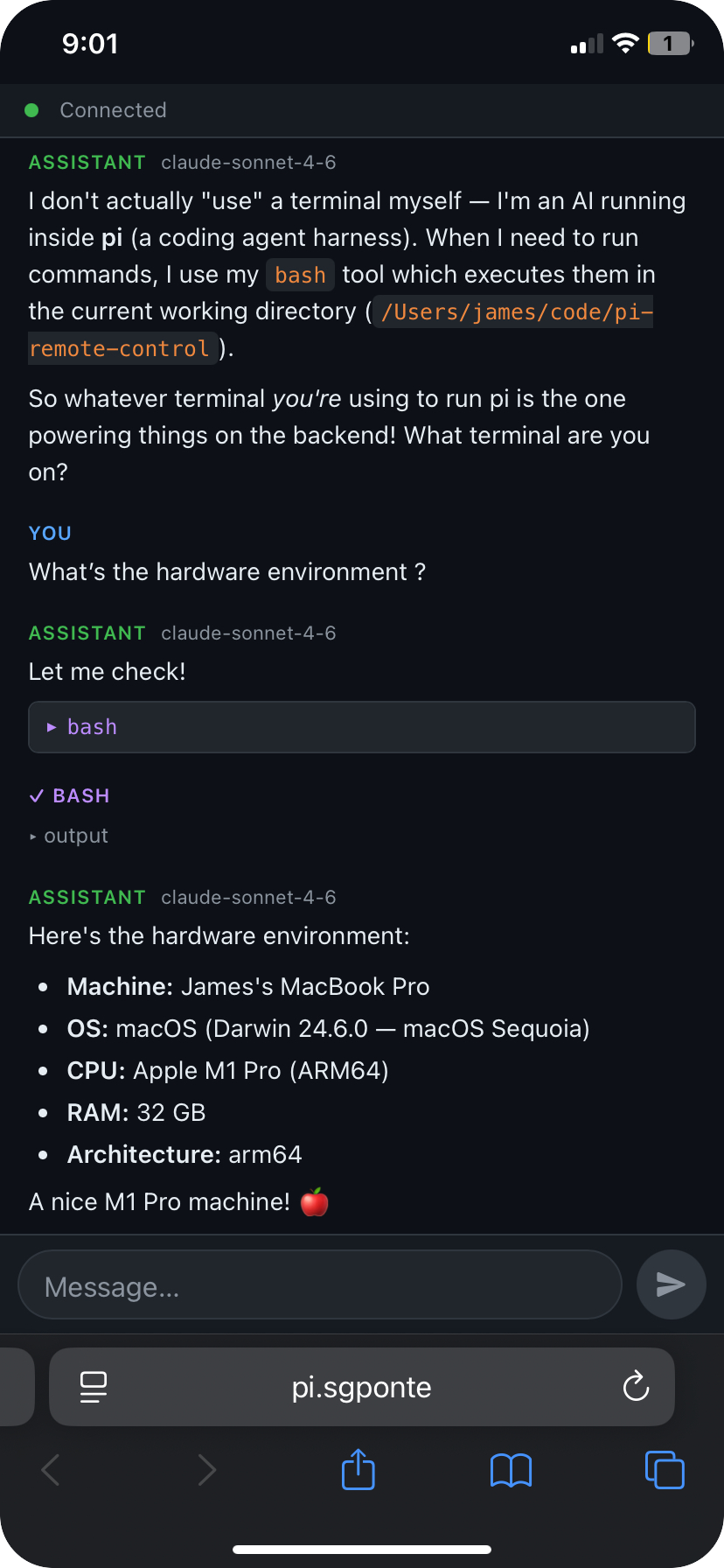
In development: native iOS app
A native iOS app is being built on top of this extension's WebSocket infrastructure. Design goals:
- Byte-exact mirror of the terminal session — what you see over SSH is what you see on the phone, rendered via SwiftTerm.
- Session persistence — sessions run for days, the app reconnects instantly after backgrounding (< 1s, via sequence-cursor delta replay).
- Multi-session — spawn, name, and switch between pi sessions from the phone as easily as browser tabs.
- Pi-aware augmentation — modifier bar tuned for pi (Ctrl, Esc, Tab, arrows, Shift+Enter), slash-command palette, status bar showing what pi is currently doing, push notifications when pi is waiting for input.
- QR pairing — scan once, self-signed TLS + token pinned automatically.
Architecture (in progress)
pi (Ink TUI) ◄──► tmux session ◄──► SSH (Mac terminal)
                       │
                  tmux -C (control mode)
                       │
               pi-remote sidecar (this extension, extended)
                       │ wss:// (binary ANSI + JSON side-channel)
                       ▼
               iOS app (SwiftUI + SwiftTerm)
Streaming uses tmux control mode (tmux -C) rather than pipe-pane —
verified reliable across alternate-screen transitions in a PoC spike.
Implementation docs
All planning and coordination lives in docs/:
| File | Purpose |
|---|---|
docs/NEXT-STEPS.md |
Current state + what to do next |
docs/PHASE-1-sidecar.md |
Sidecar production-ready |
docs/PHASE-2-ios-mvp.md |
iOS app MVP |
docs/PHASE-3-ios-augmentation.md |
iOS polish features |
docs/SYNC.md |
Multi-agent coordination |
docs/reference/SPEC-ios-app.md |
Full feature spec (v3) |
Running pi-remote as a sidecar (Phase 1)
All Phase 1 sidecar modules are implemented. See the full Operator Guide for details.
Quick start
# Start pi with the sidecar auto-enabled
pi -e extensions/remote-control --remote-control
# → Remote-control started: http://127.0.0.1:7777/?token=<TOKEN>

# Create a tmux session
curl -s "http://127.0.0.1:7777/sessions?token=<TOKEN>" \
  -X POST -H 'Content-Type: application/json' -d '{"name":"work"}'

# Stream output via wscat
npm install -g wscat
wscat -c "ws://127.0.0.1:7777/sessions/work/stream?token=<TOKEN>"
# → send: {"type":"resume","lastSeq":null}

# Send a keystroke
curl -s "http://127.0.0.1:7777/sessions/work/input?token=<TOKEN>" \
  -X POST -H 'Content-Type: application/json' -d '{"type":"keys","data":"ls"}'

# Pair the iOS app (generates QR code)
node extensions/remote-control/cli/index.js pair
What's implemented
| Module | Files |
|---|---|
| Server scaffold | server/server.ts, server/upgrade.ts, server/types.ts |
| tmux control-mode | tmux/manager.ts, tmux/control.ts, tmux/input.ts, tmux/snapshot.ts |
| Disk ring-buffer | buffer/writer.ts, buffer/reader.ts, sequence.ts |
| Auth + pairing + TLS | auth/tokens.ts, auth/pairing.ts, auth/tls.ts |
| pi adapter | pi/events.ts, pi/commands.ts, pi/autoname.ts |
| REST routes | server/routes/{sessions,commands,health}.ts |
| WS routes | server/routes/{stream,side}.ts, server/upgrade.ts |
| APNs scaffold | apns/push.ts |
| CLI | cli/index.ts (pair, auth list/create/revoke/name) |
Security notes
- The server only listens on localhost. Remote access depends on your tunnel.
- No multi-user authentication. The connection URL is a per-session secret.
- iOS app (in development) uses bearer tokens stored in the iOS Keychain, self-signed TLS with fingerprint pinning via QR pairing, and optional Face-ID gate — no CA or public PKI required.
- If using a reverse proxy, terminate TLS there and do not expose the dynamic backend port directly.